The units displayed on the Management Accounts spreadsheet can be updated from within the Management Accounts setup.
Updating the Units
- Open the Management Accounts spreadsheet.
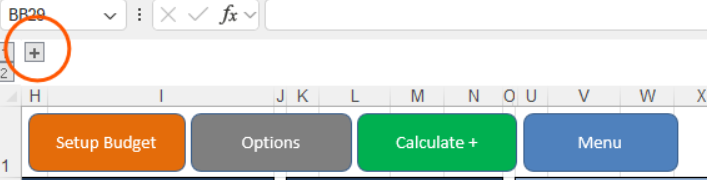
- Click the + sign to expand the required section.
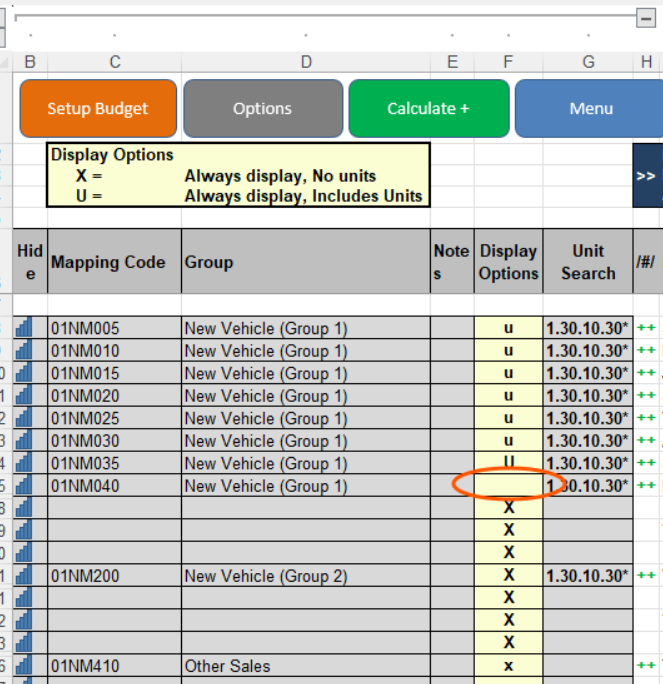
- Locate Column F.
- Enter U in Column F against the line where units are required.
- Save your changes.
Once U has been entered, the relevant unit figures will be populated on the Management Accounts spreadsheet.
Important
Make sure U is entered against the correct line in Column F, as this determines where unit information is displayed within the Management Accounts.
Was this article helpful?
That’s Great!
Thank you for your feedback
Sorry! We couldn't be helpful
Thank you for your feedback
Feedback sent
We appreciate your effort and will try to fix the article