By default, sales jobs are charged to the sales vehicle and included in the deal profit calculation.
When a job relates to external work, such as damage repairs to be billed elsewhere, those costs should not impact the vehicle’s margin.
This process allows you to correctly charge the other company while keeping the vehicle’s service history complete.
When to Use
Use this process when:
The job is related to a sales vehicle.
The cost should be invoiced to another company instead of added to the deal.
Examples include damage claims, warranty recharges, or cross-company work.
Steps
Open the Sales Job in the Workshop system.
Locate the relevant Request Lines.
Change the from Sales Dept to Other Account.
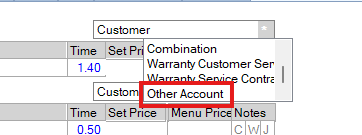
Select the correct Sales Ledger Account for the company being invoiced.
Post the invoice as normal.
Result
The cost is invoiced to the selected company.
The transaction does not appear in the vehicle deal.
The work still appears in the vehicle’s Service History for reference.
Key Points
Always verify that the correct sales ledger account is selected.
Only use “Other Account” for work genuinely billable outside the deal.
This process keeps profit reporting accurate while maintaining a complete vehicle record.
Was this article helpful?
That’s Great!
Thank you for your feedback
Sorry! We couldn't be helpful
Thank you for your feedback
Feedback sent
We appreciate your effort and will try to fix the article