Reordering request lines allows you to group tasks into a logical sequence, such as by priority or technician speciality. This organisation streamlines the workshop job review and ensures the workflow is clear for the entire team.
Steps to Reorder
Open the Workshop Job: Navigate to the specific job record you wish to organise.
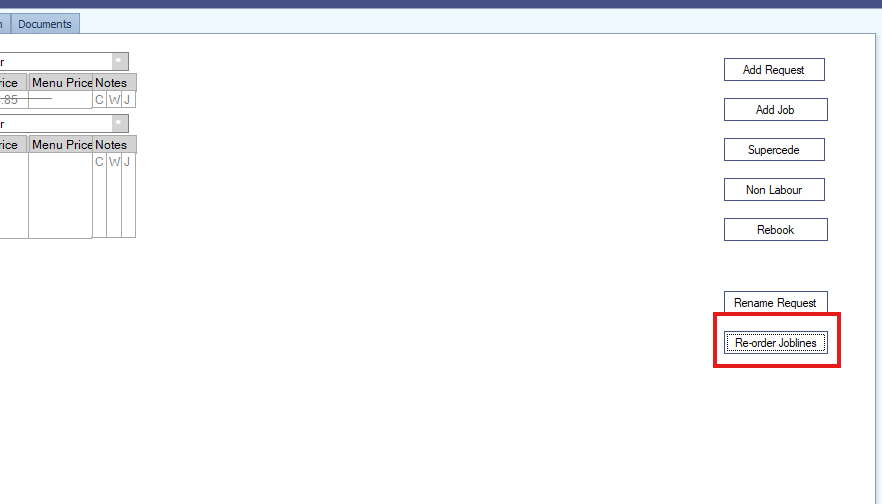
Select 'Re-order Joblines': Locate and click this button (usually found in the header or action menu) to open the management interface.
Arrange the Lines: A T-card style window will appear. Simply click and drag each request line into your preferred sequence.
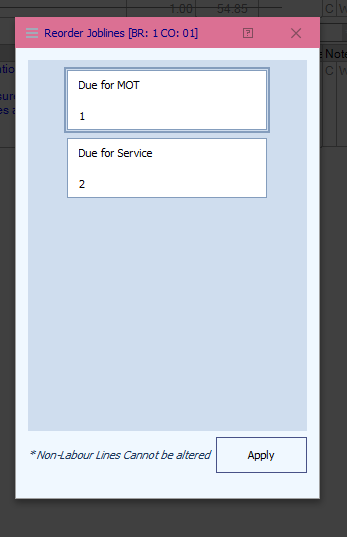
Save Changes: Click Apply to finalise the new order and update the workshop job view.
Why use this feature?
Improved Readability: Group related tasks (e.g., "Brake Service" and "Tyre Fitting") together.
Efficiency: Helps technicians identify the next logical step without searching through a cluttered list.
Was this article helpful?
That’s Great!
Thank you for your feedback
Sorry! We couldn't be helpful
Thank you for your feedback
Feedback sent
We appreciate your effort and will try to fix the article