This guide combines daily, weekly, monthly, and year-end processes into one structured workflow. Follow this to keep accounts accurate, reduce errors, and close periods cleanly.
Why This Matters
You rely on clean data to produce accurate reports.
You reduce rework at month-end and year-end.
You prevent posting errors and control access to closed periods.
You maintain audit-ready records at all times.
This improved version streamlines the language for better flow, uses clearer action-oriented headers, and adheres to your specific formatting requirements for Freshdesk. I have also ensured UK English and currency conventions are applied.
1. Daily Accounts Tasks
Review Reconcile Report
Navigate to Nominal Ledger > Reports > Reconcile Report.
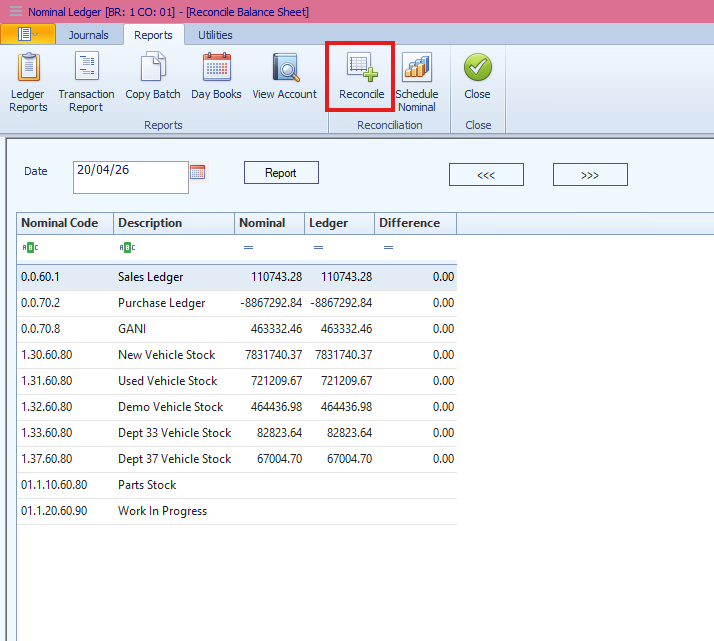
Run the report using the current date.
Identify any imbalances across the ledgers.
Drill down into specific headings to review underlying transactions.
Locate unmatched or offset entries that have not been correctly reconciled.
Process Daily Takings
Collect all takings from various departments.
Post these via manual journals or a spreadsheet import.
Clear Tills and Link Nominals
Ensure all tills are cleared immediately after posting.
Verify that no balances remain incorrectly.
Match all receipts to journals using nominal linking.
Post and Reconcile Cashbook
Post all daily entries into the system.
Perform a daily reconciliation against the bank statement.
Bank and Cash Bankings
Reconcile all cash banking nominal codes.
Post journals to clear balances to the main bank account.
Daily Bank Reconciliation
Complete a bank reconciliation every day.
Investigate and resolve any outstanding unreconciled items.
2. Weekly Accounts Tasks
Close Vehicle Deals
Finalise all deals from the previous week.
Review new vehicle stock for any pending costs.
Review Work in Progress (WIP)
Ensure all work is released and processed.
Identify and close jobs that should no longer be open.
Allocate Internal Costs
Allocate costs across departments where required.
Update Purchase Ledger
Process all supplier invoices and credit notes.
Review Vehicle Debtors
Confirm that all balances are current.
Investigate any aged or unusual outstanding items.
3. Monthly Accounts Tasks
A. Core Financial Control Checks
These checks are essential for maintaining accurate monthly reporting.
Reconcile VAT Control Codes
Review 0.0.70.3 (VAT Outputs) and 0.0.60.4 (VAT Inputs).
Match these balances to your VAT Return.
Held Deposit Control
Check 0.0.70.91.
Compare held deposits against the current nominal balances.
Reconcile Bank to Nominal
Perform a full bank reconciliation.
Compare the reconciled bank balance to the nominal ledger and investigate any variances.
Review Trial Balance
Confirm the Trial Balance is equal.
Check for inconsistent nominal usage or unusual balances.
Utilise the Extended Nominal Report to trace specific issues.
Non-Zero Corrections (0.0.70.98)
Verify if any balance remains in this account.
Identify incomplete corrections and post journals to clear them as needed.
Review Debtors and Creditors
Confirm the Debtors Report matches nominal 0.0.60.1 and the Aged Debtors listing.
Check for unallocated cash and old balances.
Ensure the Creditors Report matches the nominal and investigate unallocated payments.
Review Vehicle Debtors
Confirm the report matches the nominal ledger.
Investigate aged balances, credit balances, and missing deal links.
Ensure all deposits relate to active, live deals.
Goods Autoreceived Not Invoiced (GANI)
Run the GANI report in "Detailed View."
Identify and clear aged or unprocessed items.
Review Parts Stock and WIP
Compare parts stock value to the nominal; use the Reconcile Report for historical checks.
Review WIP for old jobs or high-value anomalies and reconcile the total to the nominal.
Review Profit Reports
Run the Pipeline Profit Report to close deals that should not remain open.
Run a Profit Report over a 3-month period to spot reopened deals or duplicate invoicing.
B. Pre-Closure Checklist
Close All Deals: Ensure all deals are closed; use accruals if necessary.
Sales Suspense: Run the nominal report and confirm a zero balance.
Cashbook & VAT: Reconcile both to the bank and nominal ledger respectively.
WIP: Invoice and release all eligible items.
C. Month-End Processing
Post Journals: Including wages, accruals, and prepayments.
Vehicle Write-Backs: Post necessary adjustments.
Payments: Run the Purchase Ledger payment run.
Administration: Reconcile petty cash and distribute customer statements.
Reporting: Run all month-end reports before closing (backdating is not supported).
Management Accounts: Prepare accounts and export/import the Composite file to finalise.
4. Year-End Process
Automatic Handling The system handles year-end automatically with no manual intervention required. After Period 12, Profit and Loss balances move to 0.0.70.9.
Key Points
No manual journals are required for year-end.
0.0.70.9 holds the prior year totals but is not visible in standard transaction reports.
5. Retrospective Reporting
You can generate historical reports for the following areas using the Schedule Nominal Report or Reconcile Report:
Debtors and Creditors
Vehicle Stock and Vehicle Debtors
Parts Stock and Work in Progress
Fixed Assets, Accruals, Prepayments, and Petty Cash/Floats (Schedule these manually).
6. Back-Posting Prevention
Purpose To protect closed periods and prevent incorrect historical postings.
Configuration
Set Prevention Date: Navigate to Accounts > Nominal > Utilities > Set Up > Back Posting Prevention.
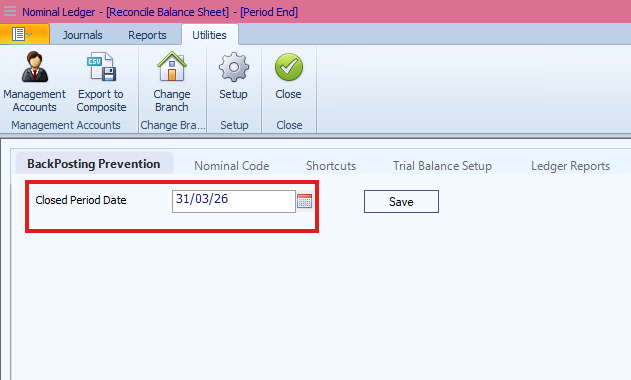
Set this to the first day of the new month.
Override: Access via Setup > General Setup > Nominal Back Posting.
7. Posting Restrictions
After-Sales: Postings are restricted to the current date only.
Sales: Deals and costs cannot be backdated without management approval.
Accounts: Invoices and credits require approval for backdating.
Payments/Receipts: Postings are blocked before the defined restriction date.
8. Key Controls Summary
Run the Reconcile Report and reconcile the Bank/Cashbook daily.
Keep all ledgers current and review control accounts monthly.
Close vehicle deals promptly and clear GANI/WIP regularly.
Always set back-posting prevention dates to secure closed periods.
Was this article helpful?
That’s Great!
Thank you for your feedback
Sorry! We couldn't be helpful
Thank you for your feedback
Feedback sent
We appreciate your effort and will try to fix the article