The Vehicle Profit Report now includes the invoice number associated with each deal, making it easier to identify and track invoiced transactions.
Why This Matters
Adding invoice numbers to the report helps you:
- Cross-reference deals with invoices
- Improve audit and reconciliation processes
- Identify vehicle sales more quickly
- Export complete reporting data for analysis
Viewing Invoice Numbers in the Pipeline Profit Report
- Open the Vehicle Pipeline Profit Report.
- Review the report results.
- Locate the new Invoice Number column.
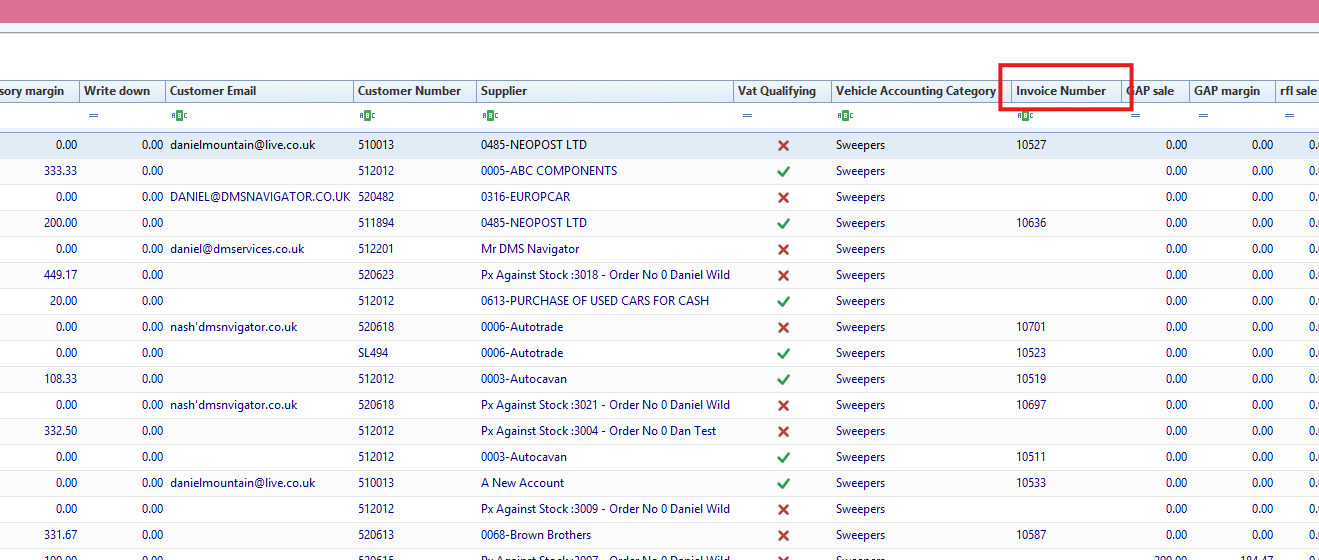
The latest vehicle invoice number is displayed against each deal.
Exporting the Report
To export the report:
- Right-click anywhere within the report.
- Select either:
- Export to Excel
- Export to CSV
Result
Invoice numbers are available directly within the Vehicle Profit Report and included in exported data.
Was this article helpful?
That’s Great!
Thank you for your feedback
Sorry! We couldn't be helpful
Thank you for your feedback
Feedback sent
We appreciate your effort and will try to fix the article