The Purchase Price Update function allows you to update the expected vehicle cost when posting the purchase invoice.
This ensures the correct cost is used for marginal VAT calculations on used vehicles.
Why This Matters
Accurate expected costs are essential for correct marginal VAT reporting.
If the cost is incorrect, VAT on profit may be miscalculated.
This function ensures that when the purchase invoice is posted, the system reflects the actual cost used to determine VAT on the margin.
When to Use
Use this function when posting the vehicle purchase invoice for a used margin vehicle.
It is especially useful for SOR (Sale or Return) vehicles, but only if no sales invoice has been raised against the vehicle.
Do not use it for additional costs or adjustments - those can trigger the update prompt incorrectly.
Steps
Open the Vehicle Stock Record.
Go to the Purchase tab.
Select Post Purchase Invoice.
Post the invoice as normal.
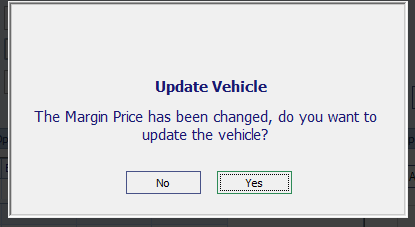
When prompted, choose whether to update the Margin Price:
Yes – only if you are posting the main vehicle purchase cost.
No – if the update prompt appears due to other costs (e.g. fees or reconditioning).
How It Works
The Margin Price represents the cost used to calculate marginal VAT.
Marginal VAT is based on the difference between the purchase cost and the sale price.
By confirming the update during invoice posting, you ensure the system uses the correct cost for VAT calculations.
Key Points
Works only if no sales invoice has been raised.
Do not update the margin price for non-purchase costs.
Keeps your VAT and profit reporting accurate.
Was this article helpful?
That’s Great!
Thank you for your feedback
Sorry! We couldn't be helpful
Thank you for your feedback
Feedback sent
We appreciate your effort and will try to fix the article