A PX Write Back is created when the vehicle's Stand In Value is different from the Customer PX Allowance.
The difference between these two values is automatically posted as a PX Write Back cost.
This ensures:
- The stock value remains accurate.
- The customer allowance is recorded correctly.
- The write back amount appears in Costs Analysis.
Why This Matters
Correctly recording a PX Write Back:
- Maintains accurate vehicle profitability.
- Prevents stock valuation discrepancies.
- Ensures accounting and reporting figures remain correct.
- Separates customer negotiation value from internal stock value.
Example Scenario
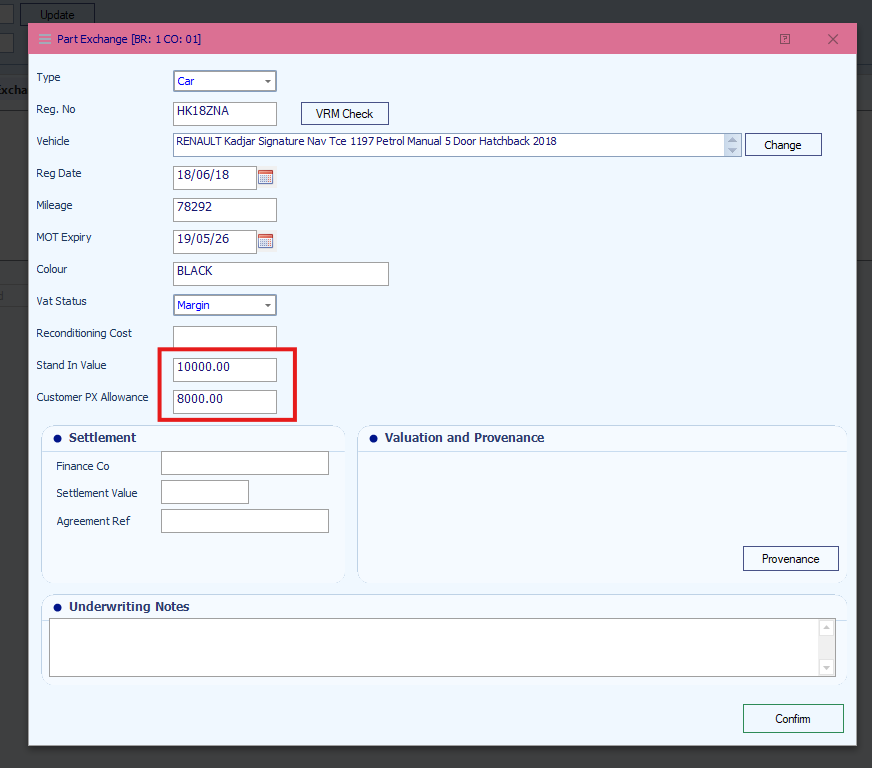
In this example:
- Stand In Value = £10,000
- Customer PX Allowance = £8,000
Difference:
- £10,000 - £8,000 = £2,000
This creates a PX Write Back value of £2,000.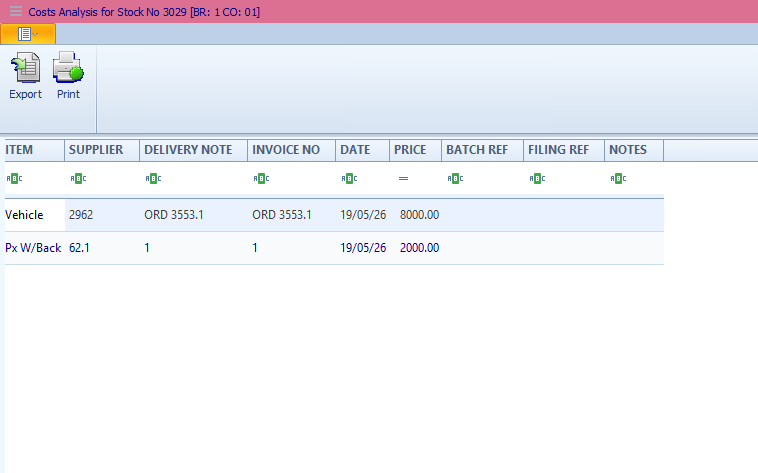
Was this article helpful?
That’s Great!
Thank you for your feedback
Sorry! We couldn't be helpful
Thank you for your feedback
Feedback sent
We appreciate your effort and will try to fix the article