A stock record may show the following status:
SOLD, CLOSED, PENDING
When this happens, the vehicle may not close correctly as paid but the debtor will be zero and everything will look as though it should be closed and paid
This issue is fixed in the next full release. In the meantime, the workaround below can be used.
Workaround
- Open the affected Stock Record.
- Go to the Vehicle details screen and ensure you are on the Details tab.
- Locate the field called Manufacturer VIN.
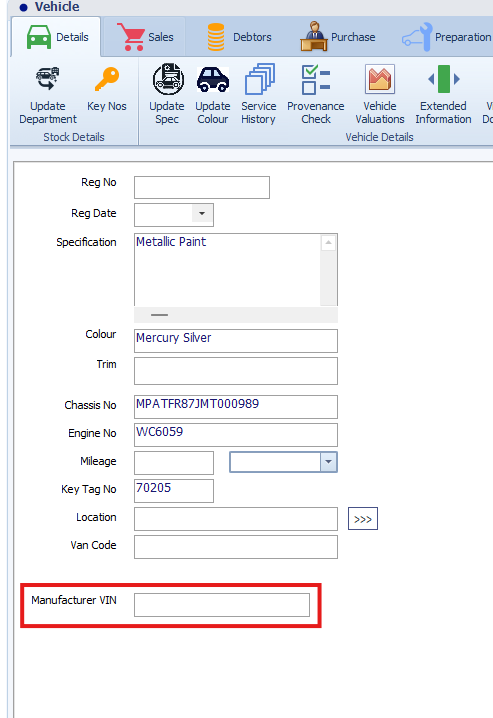
- Enter:
1
- Save/close the stock record.
- The stock record should then close as paid.
Example
In the Vehicle details screen, the Manufacturer VIN field is located near the bottom of the vehicle details section.
Enter 1 into this field and save the record.
Important Notes
This is a temporary workaround only.
The issue has already been resolved and will be included in the next full release. Once the release has been applied, this workaround should no longer be required.
Was this article helpful?
That’s Great!
Thank you for your feedback
Sorry! We couldn't be helpful
Thank you for your feedback
Feedback sent
We appreciate your effort and will try to fix the article