What are Suggested Payments?
Suggested Payments helps you quickly identify which supplier invoices are due for payment and generate a list of payments to make.
The feature reviews outstanding Purchase Ledger invoices based on terms set against all accounts, allowing you to create a payment run without manually selecting each invoice.
How Does It Work?
- Open Purchase Ledger > Suggested Payments.
- Choose the suppliers or payment criteria you want to include, such as:
- BACS
- Cheque
- Generate the suggested payment list.
- Review the invoices that have been selected.
- Deselect any invoices you do not wish to pay.
- Create the payment run.
The system will generate the payments for the selected invoices, ready to be posted.
How Are Invoices Selected?
Suggested Payments typically includes invoices that:
- Are outstanding and unpaid.
- Fall within the due date or payment criteria you have selected.
- Have not already been included in another payment run.
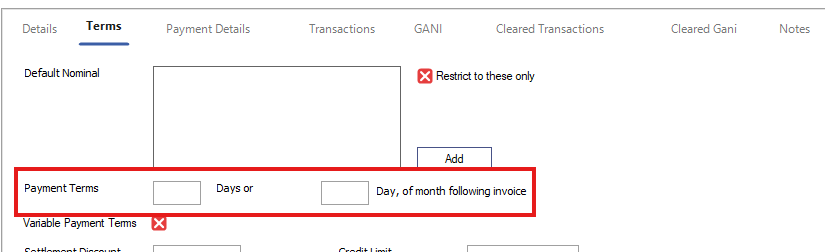
The selection will also be calculated based on the payment terms set against each account. This is within the Terms tab.
The system is designed to save time by automatically selecting invoices that are due, but you remain in control and can amend the list before creating the payment.
Was this article helpful?
That’s Great!
Thank you for your feedback
Sorry! We couldn't be helpful
Thank you for your feedback
Feedback sent
We appreciate your effort and will try to fix the article