Learn the exact steps for applying a bonus within the DMS Navigator system. This video walks you through the entire process, ensuring accurate tracking of vehicle incentives.
The Process:
Navigate to: Vehicles > Vehicle Admin Toolkit
Load the target vehicle.
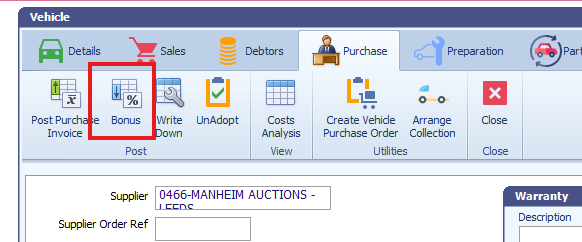
Go to the Purchase tab and select Bonus.
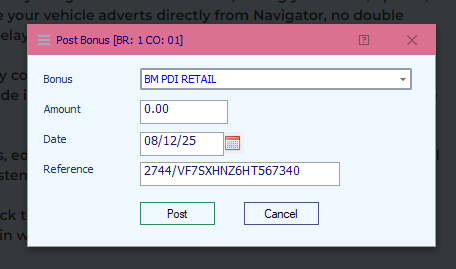
Select the appropriate bonus from the drop-down list, enter the amount and date, and press 'Post'.
Configuration Tip: To set up or modify bonus options, go to: Vehicles > Vehicle Parameter Maintenance > Bonuses.
Was this article helpful?
That’s Great!
Thank you for your feedback
Sorry! We couldn't be helpful
Thank you for your feedback
Feedback sent
We appreciate your effort and will try to fix the article