The Vehicle Model Clean Up function is a utility designed to help users manage their vehicle database effectively by removing unwanted or redundant vehicle models (non curraas well as adding them back in bulk (current). It is especially useful in cases where models have been misspelled, leading to inaccuracies in the database, or when models have been discontinued by the manufacturer and are no longer relevant to the organisation's operations.
Accurate and updated vehicle information is critical for smooth workflow management, whether for inventory tracking, reporting, or service-related processes. By using this function, you can streamline your database and ensure that your vehicle model listings reflect only the most accurate and current information.
Why Use the Vehicle Model Remover?
- Correct Errors: Eliminate misspelled models that can cause confusion in reports or searches.
- Declutter Data: Remove outdated or discontinued vehicle models, reducing database bloat and improving navigation.
- Maintain Accuracy: Ensure that all vehicle data aligns with the latest manufacturer updates, aiding in professional service delivery.
Step-by-Step Instructions
Access the Vehicle Model Remover:
- This can be found under Vehicles > Model Clear Down
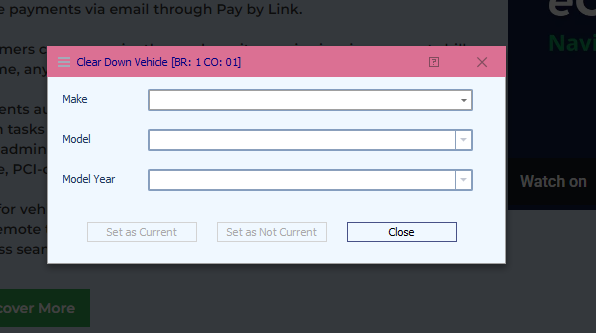
- This can be found under Vehicles > Model Clear Down
Select the Make and Model and Model Year:
- Use the dropdown menus to choose the Make (manufacturer) and the specific Model and Model Year you wish to remove.
- Select if you want to set them as Current or Non Curre
Key Features
Safe to Use: The Vehicle Model Remover function is designed to work seamlessly with existing records. Removing a model will not impact historical data or records where the model has been referenced. This ensures that your workflow remains uninterrupted while still allowing for database updates.
Scenarios Where This Tool is Useful
- A model is discontinued by the manufacturer, and you need to update your system to reflect the latest line up.
- An entry in your database contains typo errors, creating duplicate or misleading entries.
- Your organisation undergoes a database clean up to enhance system performance and reduce confusion.
Was this article helpful?
That’s Great!
Thank you for your feedback
Sorry! We couldn't be helpful
Thank you for your feedback
Feedback sent
We appreciate your effort and will try to fix the article