You can now change branches directly from most screens without returning to the front screen.
Steps
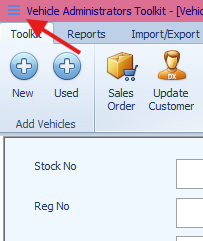
Open the sidebar by selecting the Hamburger icon.
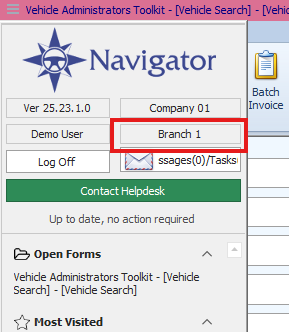
Double-click the Branch number displayed in the sidebar.
A message will appear confirming that all screens will close.
Select OK to proceed.
Choose your new branch from the list.
Why This Matters
Changing branches from within the system saves time and reduces interruptions to your workflow. It ensures you’re always working with the correct branch data without having to exit to the front screen.
Was this article helpful?
That’s Great!
Thank you for your feedback
Sorry! We couldn't be helpful
Thank you for your feedback
Feedback sent
We appreciate your effort and will try to fix the article