A new Vehicle Price Audit Report has been added to the Sales Managers Toolkit. The report provides visibility of all vehicle price changes, including previous values, updated values, and the staff member responsible for the change.
Why This Matters
The report helps you:
- Monitor vehicle pricing activity
- Review historical price changes
- Improve accountability
- Support management and audit processes
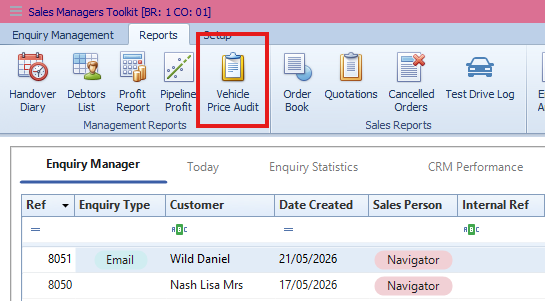
Accessing the Vehicle Price Audit Report
- Go to Vehicles.
- Open Sales Managers Toolkit.
- Select Vehicle Price Audit Report.
Information Included
The report displays:
- Vehicles with amended prices
- Previous price information
- Updated price information
- Staff member who made the change
Result
You gain a complete audit trail of vehicle price amendments across the system.
Was this article helpful?
That’s Great!
Thank you for your feedback
Sorry! We couldn't be helpful
Thank you for your feedback
Feedback sent
We appreciate your effort and will try to fix the article