If a workshop job has been booked against the wrong vehicle, you can change the vehicle directly from the existing job without cancelling or recreating the booking.
This is particularly useful when a customer owns multiple vehicles and the incorrect vehicle has been selected.
How to Change the Vehicle
Navigate to Workshop and open the existing workshop job.
Within the Details section of the job card, locate the vehicle information.
Click Change Vehicle, located alongside the current vehicle details.
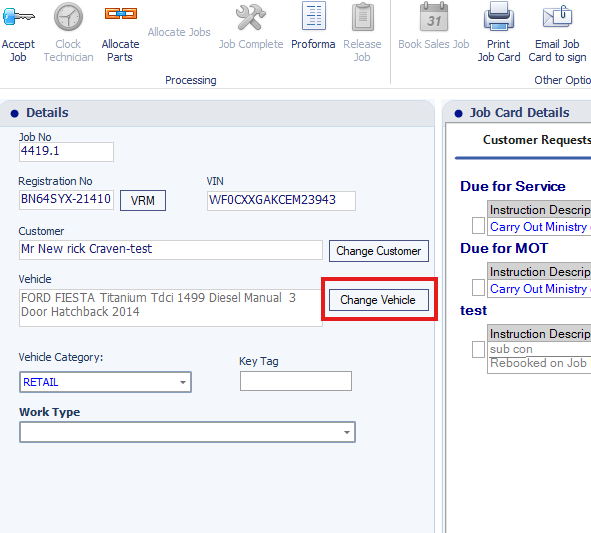
If the customer has multiple vehicles registered against their account, you will be able to select a different vehicle.
Select the correct vehicle to update the workshop job.
Check that the correct vehicle details are displayed on the job card.
What Happens When You Change the Vehicle?
The selected vehicle becomes the vehicle associated with the existing workshop job.
The existing workshop job can continue to be used without creating a new booking.
The vehicle associated with the job is updated.
The vehicle details displayed on the job card should reflect the selected vehicle.
Important: After changing the vehicle, review the job details, including any customer requests, parts or work already recorded, to ensure they remain appropriate for the newly selected vehicle.
What if Change Vehicle Does Not Work?
The Change Vehicle option requires the customer to have more than one vehicle registered against their account.
If the customer only has one vehicle, selecting Change Vehicle will cause the selection window to close without allowing a change.
To resolve this:
Open the customer's record.
Add the additional vehicle to their account.
Return to the existing workshop job.
Select Change Vehicle again.
Choose the newly added vehicle.
You can then continue using the existing workshop job.
Important Information
The alternative vehicle must already be registered against the same customer.
If the customer only has one vehicle, add the additional vehicle before attempting to change it.
You do not need to cancel and recreate the workshop booking simply to change the associated vehicle.
This functionality helps correct vehicle selection errors while retaining the existing workshop booking.
Was this article helpful?
That’s Great!
Thank you for your feedback
Sorry! We couldn't be helpful
Thank you for your feedback
Feedback sent
We appreciate your effort and will try to fix the article