On some Windows 11 computers, you may encounter the following message when attempting to open Navigator:
"Smart App Control blocked an app that may be unsafe."
This message is generated by Windows rather than Navigator and prevents the application from opening.
Navigator is compatible with Windows 11 and operates normally on other Windows 11 computers. This issue can occur when an individual computer's security settings prevent Windows from recognising or trusting the application.
What is Smart App Control?
Smart App Control is a security feature introduced by Microsoft in Windows 11.
It helps protect your computer by checking applications against Microsoft's security and reputation information before allowing them to run.
If Windows cannot confidently determine whether an application is safe, it may prevent the application from opening.
This does not automatically mean the application contains a virus or is unsafe. It simply means Windows has not been able to establish sufficient trust in it.
Why Does Navigator Work on Other Computers?
Smart App Control does not operate identically on every Windows 11 computer.
Some computers have the feature enabled, while others have it disabled or operating in a different mode.
This means Navigator may open without any issues on one Windows 11 computer but be blocked on another.
The warning is therefore not necessarily an indication of a problem with Navigator itself.
How to Turn Off Smart App Control
If Navigator has been installed from an authorised source and your IT administrator has approved the change, you can disable Smart App Control using the following steps.
Click the Windows Start button.
Search for Windows Security and open it.
Select App & browser control.
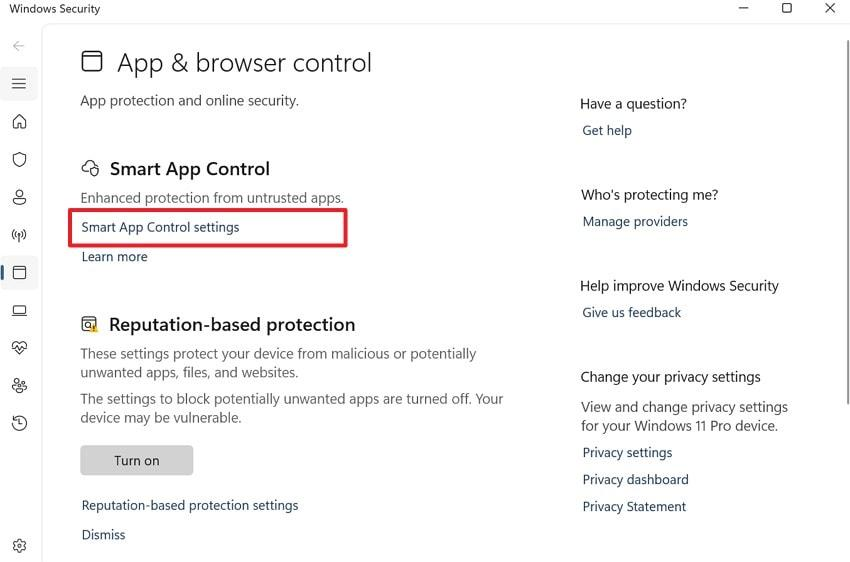
Click Smart App Control settings.
Select Off.
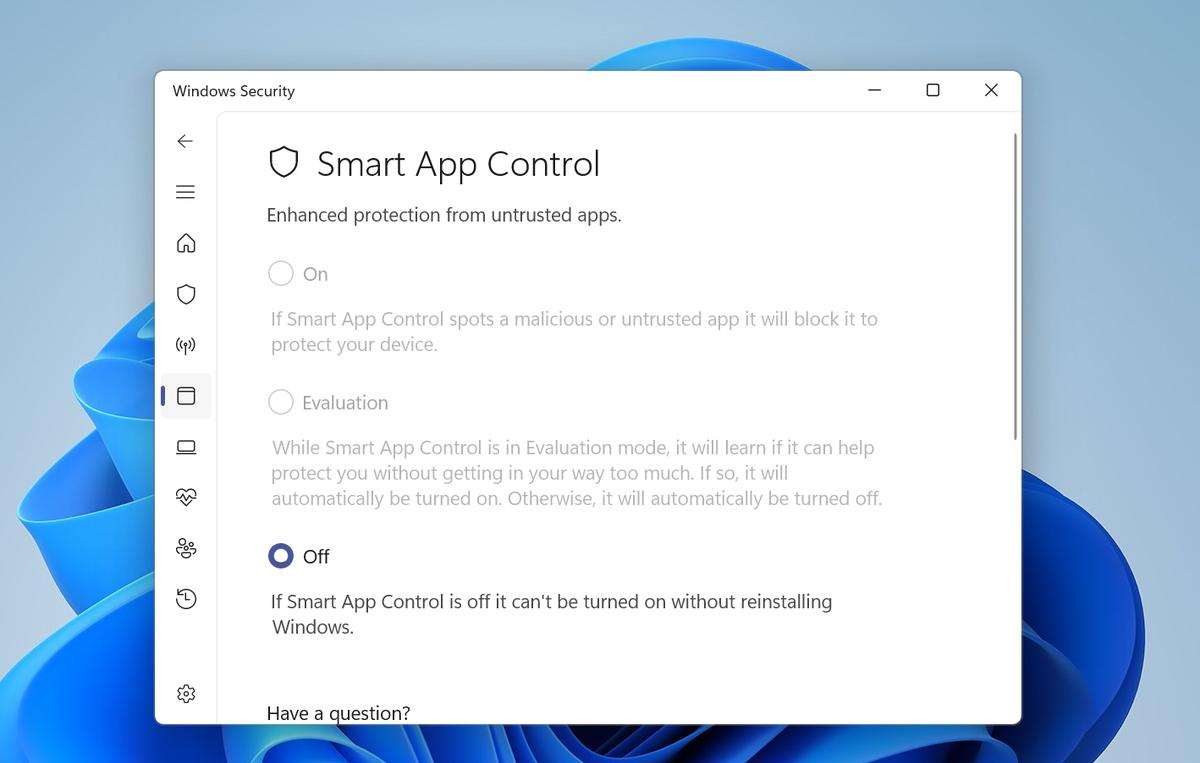
Confirm the change if prompted.
Close Windows Security.
Try opening Navigator again.
Navigator should now open normally if Smart App Control was the cause of the issue.
Is It Safe to Turn Off Smart App Control?
Smart App Control is an additional security feature rather than your computer's primary antivirus protection.
Disabling it does not automatically disable:
Microsoft Defender Antivirus
Windows Firewall
Microsoft Defender SmartScreen
Other installed antivirus software
These separate security features can continue protecting your computer.
However, turning off Smart App Control does remove an additional layer of protection against untrusted applications. For this reason, we recommend only making this change when Navigator has been installed from an authorised source and your IT administrator is satisfied that the change is appropriate.
Microsoft does not currently offer a way to allow an individual application through Smart App Control.
Important: Depending on your Windows version and updates, switching Smart App Control back on may require additional steps or a Windows reset. Please check with your IT administrator before changing this setting.
Still Unable to Open Navigator?
If Navigator continues to display an error after making the approved change, please contact Navigator Support.
Our team can help investigate whether another Windows security setting or application issue is preventing Navigator from opening.
Was this article helpful?
That’s Great!
Thank you for your feedback
Sorry! We couldn't be helpful
Thank you for your feedback
Feedback sent
We appreciate your effort and will try to fix the article