You can now remove technician clockings directly from a workshop job using the History tab. This helps correct accidental clockings and maintain accurate labour records without needing additional intervention.
Why This Matters
Accurate technician clockings are essential for:
- Correct labour reporting
- Accurate job costing
- Reliable technician productivity tracking
- Preventing incorrect time allocations against workshop jobs
How to Remove a Technician Clocking
- Open the required Workshop Job.
- Select the History tab.
- Locate the clocking entry you want to remove.
- Double-click the clocking line.
- Select Remove Clocking.
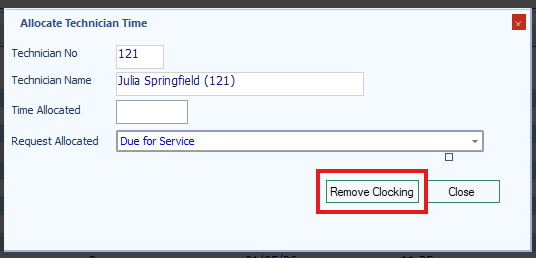
The clocking will be removed from the job.
Result
The selected technician clocking is removed from the workshop job history.
Was this article helpful?
That’s Great!
Thank you for your feedback
Sorry! We couldn't be helpful
Thank you for your feedback
Feedback sent
We appreciate your effort and will try to fix the article