This guide explains the updates in version 26.2.0 designed to improve the accuracy of technician time reporting and ensure it aligns more closely with invoiced data.
The Problem: Why Reporting Discrepancies Occur
Many Service Managers have previously noted that time allocated to technicians does not always match invoiced time. Key issues included:
Credited Jobs: Previously, crediting an invoice would delete the original time log, causing discrepancies between invoice reports and technician reports.
Multiple Technicians: Calculation errors occurred when several technicians worked on one job, particularly if some clocked onto specific lines while others clocked onto the general job card.
General Complexity: Individual technician analysis was often difficult to interpret.
The Solution: Key System Updates
1. Enhanced Invoicing and Crediting
The system now handles credits as separate entries rather than deleting historical data:
No Deletions: Crediting an invoice no longer removes the original time allocation.
Credit Notes: A credit is now created on the specific date of the credit note.
Same-Day Adjustments: If a job is re-invoiced on the same day it was credited, the hours are added to the credit to provide an accurate daily adjustment.
Delayed Re-Invoicing: If not re-invoiced the same day, the credit simply remains on the technician's report for that day.
2. Request-by-Request Time Allocation
To improve precision, the system now calculates time based on individual job requests rather than the total job card:
Specific Clocking: If a technician clocks onto a specific request, all their time is allocated to that request.
General Clocking: If a technician clocks onto the general job card, their time is split proportionally across all requests based on the time charged.
Unclaimed Requests: If a request has no specific clockings, the time is split between all technicians on the job card relative to their overall clocking times.
New Reporting Tools
To help managers analyse this data, a new report has been introduced:
Name: Techs Job Report.
Location: Service Managers Toolkit > Reports.
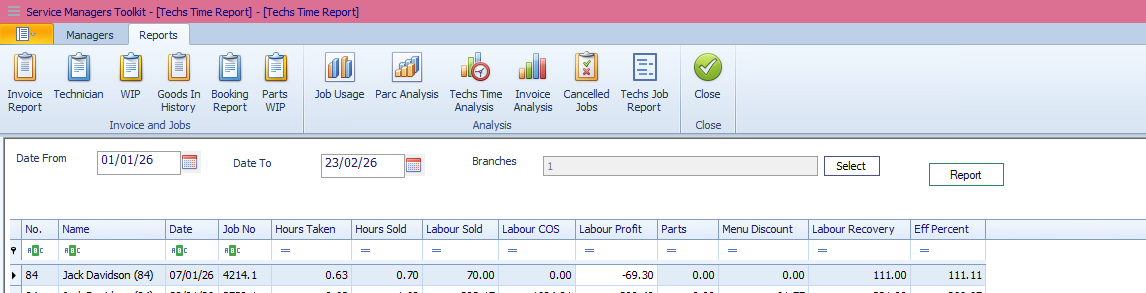
Features: It allows for date range, presenting the long-form technician analysis in a clear, tabular format. It gives job by job analysis and is exportable by right clicking the report.
Mobile Support: The Technician’s App now encourages line-by-line clocking to ensure the data feeding into these reports is as accurate as possible.
Was this article helpful?
That’s Great!
Thank you for your feedback
Sorry! We couldn't be helpful
Thank you for your feedback
Feedback sent
We appreciate your effort and will try to fix the article